How About Orange
Showing posts sorted by relevance for query silhouette. Sort by date Show all posts

October 01, 2010

Giveaway: Silhouette digital cutting tool

I've never been terribly excited about owning a digital cutter, thinking my trusty fingers and low tech X-acto knife can handle most jobs. But recently I received a Silhouette digital cutter to test and review. I'm afraid my poor old X-acto knives are going to feel neglected, because this thing is great. And you can win your own! Read on.

The Silhouette is a cute little number that's smaller than a printer, with a power cord and a USB cable that connects to your Mac or PC. After some confusion, I finally realized the accompanying instruction book is for old Windows software that doesn't look anything like the new Mac Silhouette Studio software I downloaded. Once I ignored the instruction book and referred to the Users Manual in the Help section of the new software, I was off and running. It's actually really easy to use, despite my first impression.

Now that I've got the hang of it, I'm super excited. The machine comes with 50 free shapes to cut, or you can choose from hundreds of other options available for 99 cents: boxes, cupcake wrappers, doilies, and more. Shapes are scalable and easy to modify. Or create your own shapes with the software, which works like a pared-down version of Adobe Illustrator. Or actually create your shapes in Illustrator and send them to the Silhouette. It will cut text-weight paper, card stock, adhesive vinyl, magnet or tattoo paper, and heat transfer material.

My first project was a little box. I pushed a button and the entire template was cut out in less than 30 seconds while I stood by and drank coffee. And of course it's perfect.

Then I forced it to cut something tiny and delicate from self-adhesive vinyl, just to see if it would explode. Also perfect. Dang. I'm not doing that with my X-acto knife.

For lots of project ideas, see here. As I try other things, I'll let you know how it goes.

The Giveaway: October 1 –11, 2010 (Now closed)
Want to win your own cutter? One lucky commenter will win a Silhouette machine (a $299.99 value) with everything you'll need to make it go: Software for Windows XP/Vista or Mac, a power cable, USB cable, 2 cutting mats (one for thick media, one for thin media), one cutting blade, and a $10 gift card to the Silhouette online store.

To enter the random drawing:
Leave a comment on this post by Monday, October 11 at midnight CDT. Open to US residents only; sorry! The company doesn't ship internationally. Silhouette winners from other giveaways are not eligible. Be sure to include a link or other way to contact you. The winner will be contacted and announced in this post on October 12.

Update: Giveaway is now closed. Commenter 1469, Kel O., was randomly selected and has been given the good news!

October 11, 2010

Making fabric iron-ons

My latest test with the Silhouette machine involved fabric. I ironed Heat'n Bond to the back of some thin cotton, held my breath, and ran it through the cutter. There were a couple places, mostly in corners, where the blade didn't quite cut all the way through, but it was easy to touch them up with a scissors. Then I ironed the shape onto a onesie. The machine will only cut through very light-weight fabrics, I think, and you'll likely need to apply some kind of backing or stiffener to them.

I ironed more fabric onto cardstock to make a matching notecard. The card had to be cut with a scissors since the Silhouette felt unhappy about slicing through fabric and cardstock together. That's okay. I don't want to be too demanding.

11/9/2010 Update: Just got this from the folks at Silhouette support: "Attempts to cut thicker materials or certain materials the Silhouette is not designed to cut that are more dense (such as shrink plastic, foam, chipboard) or fibrous in nature (such as fabric) may ruin the blade or result in the blade dulling very quickly." Um, okay. Sorry little blade. I won't cut fabric anymore.

1/31/2011 Update: Silhouette support now states it is possible to cut fabric using their new interfacing options. See here for more information.

November 15, 2011

How to make 3D paper ball ornaments

I love 3D paper things. Love. And when I saw a little picture of what appeared to be paper balls in a CB2 catalog, I thought, "I am going to make those."

So the other day while Alex was writing a paper about mysterious things like polymers and flexible films and tactoids, I made a paper ball. Then I proudly announced I had created a tactoid and it was sitting on my desk. He giggled. Apparently a tactoid is not a paper ball.

These are made from 12 slotted flower shapes that fit together to form a sphere. No adhesive needed; the only ingredient is paper. I made a template in Illustrator and cut out the shapes with my Silhouette machine, but you could also print out the pages and cut by hand instead.

Download the PDF templates here:
Large ball (10")– print/cut 12 sheets
Medium ball (5")– print/cut 2 sheets
Small ball (3")– print/cut 1 sheet

Download a Silhouette .studio file here:
Small ball (3")– unzip the file; cut 1 sheet. (The shapes can be scaled up or down in Silhouette Studio if you'd like to change the size.)

If you want to hang your ornament, you might like to add the string before assembling the ball. I placed a piece of tape on the back of one flower so the hole wouldn't tear, then used a needle to pull string through, forming a loop on the front side. I secured the ends of the string on the back side with another piece of tape.

Use the slits to join petals together. Keep adding shapes, connecting as you go, so that every petal is connected to another petal on a neighboring flower.

It might be helpful to think of the first piece as the "north pole," and then add a row of five flowers encircling it. At this point, the ball is half finished.

Here's what it looks like upside-down:

Attach the next row of five flower shapes, and finally, add the "south pole" piece to finish the globe.

The colored balls are made from regular-weight computer paper (Astrobright from Office Max) and the white balls are made with cardstock. The big sphere is the size of a basketball; the little one is approximately a baseball. And the medium-sized guy is maybe a large grapefruit.

October 08, 2010

How to make recycled paper flowers

I learned to make paper flowers a long time ago with directions from a library book. They don't require any adhesive, and there are just four shapes to cut out.

Use them to decorate gifts or make wreaths. I chopped up a fancy Urban Outfitters catalog for these.

You can make template pieces to trace around and then cut out the shapes with a scissors—what I used to do. But this seemed like a good test for the Silhouette cutter, so I recreated the pattern pieces in Illustrator on my Mac and commanded the machine to cut them for me. It took about fifteen seconds to cut the parts for one flower. Whoa. I shall never return to my primitive, scissors-wielding caveman ways.

If you'd like to download PDF templates, get the large flower here and the small flower here.

To cut with a Silhouette machine, download a .dxf file here. (I exported it from Adobe Illustrator.) You should be able to open it and cut from Silhouette Studio.

To make the flowers, do the following:

1. Score the back of each petal along the lines shown in pencil, above.

2. Pleat the petals along the scored lines, always folding in the same direction.

3. Fold the triangle portion of the stem in half lengthwise. Do this two more times until it reminds you of a toothpick.

4. Using a chopstick or skewer, roll the "flag" portion of the stem toward the "toothpick." This curl will form the center of the flower.

5. Curl the ends of each petal backward to give them shape.

6. With a skewer or sharp pencil, poke a hole in the center of each flower piece.

7.Thread the pieces onto the stem, from smallest to largest. Finished!

June 21, 2013

Music video made with a Silhouette Cameo


Want to see something cool? Blog reader Helen wrote to tell me that after my posts about getting and using a Silhouette paper cutting machine, her husband bought one. And then he used it to make pop-up paper sleeves for his album, plus this amazing music video for one of his songs, 10,000 Letters of Love by The Sound of the Ladies. (The band is one singer-songwriter-physicist guy, Martin Austwick.) To see how he did it, read here.

Helen says a paper-crafty beast has been unleashed. No kidding.

February 16, 2012

More DIY cut-paper pendants

Turns out I can do two brainless activities at the same time: watch people pass out on American Idol, and glue small stacks of paper together. I made these pendants last night. Like the pixel heart version, I created a design in Adobe Illustrator, cut a dozen shapes out of cardstock using my Silhouette cutting machine, and glued them into a stack. When the glue dries, the pendant is hard and strong. Each of these is about 2" tall and 1/8" thick. See here for a slightly more detailed how-to.

In the geometric pendant in the first photo above, I sandwiched two "filler" shapes in the center of the pile to add some solid areas.

To download the template files (PDF, .svg, and .dxf for the Silhouette machine), click here.


October 08, 2010

Playing with vinyl decals

One project I wanted to try with the Silhouette cutter was glass etching. I cut this design (Bone Stitch Border C00225_19547) on vinyl, then stuck the inner piece to this white vase to spice it up. Couldn't let that shape go to waste.

My real intention for the vinyl was to apply the leftover outline to a glass vase, paint in the spaces with etching cream, and peel off the vinyl to reveal the cool design on the vase. Cutting the vinyl went just fine, but then I hit a snag. Silhouette offers transfer paper intended to hold all your vinyl pieces in place while you position them. The idea is to stick it to the top side of the vinyl, then pull the backing off the vinyl. Adhere the design to your surface and pull the transfer paper off the front. All the vinyl pieces should remain attached to your surface.

Only they came up with the paper instead of sticking to the glass. My plans were foiled! Experienced transfer paper users, is there something I'm not understanding?

November 03, 2010

Butterfly invitation template

Let's call this stationery week at How About Orange. Friends inexplicably keep marrying and having babies, so here are some shower invitations I made with a pal last week.

The mom-to-be registered for purple butterfly things, so I had to hold off on the orange cheetah-themed shower that could have been awesome. I think this one might be more tasteful. I made the design in Adobe Illustrator, then cut the cards out with the Silhouette machine. The party information is printed on an interior sheet. It's stapled inside the card along the spine to form a mini booklet. Chartreuse envelopes from Papersource plus these stamps finished it off.

You can download the butterfly template as a PDF file, a zipped Studio file for Silhouette users, or a zipped SVG file for Cricut users. And folks without a digital cutter will have to make do with an X-acto knife. Eek, that's a little bit daunting.

March 27, 2013

Floral Easter eggs with printable decals


I dug out some old hand-drawn illustrations I did ages ago and arranged them into little tattoos for Easter eggs.

If you'd like to make some eggs like this, download the free sheet of decals.


Print it on ink jet temporary tattoo paper and follow the application instructions on the package. It's super easy. After the decals are prepared, just place a trimmed shape on an egg (or yourself), hold a wet cloth on it for 10 seconds, and pull off the paper backing. Smooth out any wrinkles with your finger.

I used Silhouette brand tattoo paper purchased at my local PaperSource last year, but you can also get similar stuff from DecalPaper.com.


October 21, 2010

DIY heat transfer tote

Still experimenting with my Silhouette digital cutter, I tried out some heat transfer material that came with the machine. The result is this tote. I cut my own design from Adobe Illustrator, which went beautifully.

When it came to ironing the pieces onto the bag, I had a little trouble. Though you can't see it in the photo, some little bits of the black shapes aren't quite stuck down all the way on the tote. Maybe I can go back and fix that somehow, but I'm not optimistic. It was a big struggle to get them to adhere to such coarse canvas, so I'd recommend ironing this stuff onto something smoother. I had a wrestling match with my iron and the tote bag. We had to roll around on the ground in a fist fight with some sweating and cursing, but I won. Mostly.

April 18, 2013

How to make a paper bow


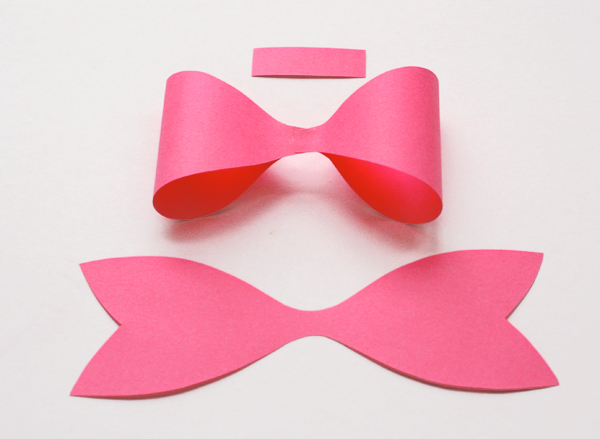
I've gotten some questions asking how I made the paper bow on the bottom package in this post. Here's a quick tutorial. I made a template so you can see the parts. Download the free file you need:

The PDF template
Files for digital cutting machines:
The zipped Silhouette .studio file (double click the .zip file after downloading)
The .svg file
The .dxf file

If you print the PDF on colored paper and cut out the pieces, you'll have enough parts to make two bows. Or you can just freehand cut some pieces like I did originally; I folded my paper in half so that both sides of the bow would be symmetrical when I cut. Sort of like you do when cutting out paper hearts, you know?


Anyhow, whether you wing it or use the template, you'll need three parts for each bow: the band in the middle, the loops, and the tails.


Grab the two outer tabs on the "loops" piece, bend them to the center, and glue them down.


Layer the loops piece on top of the tails with a dot of glue, then wrap the band around the center and secure it in the back with a little more glue. All done!

April 06, 2012

DIY Pantone Easter eggs

The graphic designer in me couldn't resist attempting faux Pantone Easter eggs.

I dyed these boiled eggs by standing them vertically in small cups of dye. Then I typed up the labels and printed them on ink jet temporary tattoo paper. Remember to print the words backwards! I used Silhouette brand tattoo paper I bought at my local PaperSource, but you can also get similar stuff elsewhere. I matched the color numbers using my chip book. Knowing they were correct gave me great inner satisfaction.

February 11, 2010

Big list of DIY wall art ideas

Got an empty spot on your wall and no ideas for what could possibly go there? Here's a list of projects you could make yourself.

License plate collage at DIY Ideas, left
Tea cup clock (try your own DIY version) at Sweet Paul, right
Torn canvas wall art by Elepheight (possibly helpful tips here)
Twig-framed mirror at Point Click Home
Wallpaper tree at Country Living
Geometric painted canvas at Express Night Out
Giant clock made from globes at Woman's Day
Collage made with an old book by Tangente
CD case wall art at Re-nest
Giant shabby chic dominoes by Shanty2Chic
Embroidery hoops framing fabric at Curbly
Painted thrift store frames at The Guardian
Framed objects (try your own DIY version) by the.
Large wallpaper panels at All You
Paper silhouette art at Time Out New York
Patterned wall squares by yours truly

(Images by DIY Ideas and Wendell Webber)

August 17, 2009

Handmade projects to try

How to screen print on fabric by Krissy at Kelly + Olive, left
How to carve a mushroom from a radish by Anna the Red, right
How to make recycled juice carton wallets at Family Fun
How to fold Japanese paper kusudama balls at Metacafe
How to cut a forest silhouette (scherenschnitte) by Cindy Ferguson
How to make beads from recycled newspaper at A Storybook Life

January 27, 2011

Asterisk heart garland template

Who says Valentine's Day has to be pink? I vote for orange.

To make your own Valentine garland, download the heart template PDF right here. You can print it on a sheet of cardstock* and cut out the inner shapes with a craft knife. I cheated and cut these directly from Adobe Illustrator using my Silhouette cutter, which took just a couple minutes.

*This template only works with orange** paper. If you use another color, your project will fail.

**I am kidding, of course. As soon as I typed that, I realized from past experience that I would get a handful of emails from concerned crafters wondering if this is actually true. It's not.

July 15, 2008

Fabric and paint

I had leftover fabric from a pillow project, so I decided to try out Anna Maria Horner's silhouette idea. Worked like a charm! You stretch fabric over a canvas, paint it with gel medium to sort of seal it and make a smooth surface, transfer or draw on your shape, then use acrylic paint to fill in the outsides. You can see her tutorial here. (This design is based on some Chinese paper cutouts I saw in a book. The purple fabric is this stuff.)

Clarification: I didn't cut out a stencil like the tutorial said, but transferred my design on with graphite paper and then painted around it. And I used Golden brand matte gel medium instead of mod podge.
This was a project for my friend's office. (Some of you know who I'm talking about.) She has a little sofa, a desk, a bookshelf, and some naked walls, so I put together a few decorations. Because nobody should have naked walls. Sewed some pillows, found this print on Imagekind, got a cheap frame from Ikea, and made the purple painting to take up some wall space. This Photoshop collage was my test to see if the things would look okay together.

July 13, 2010

DIY projects for the home

Country Living magazine has a nice little library of DIY projects online, including these things you can make:
Silhouette bulletin boards
A bookcase made from a dresser
Stenciled animal mugs
A mini greenhouse made from picture frames

See more projects right here.

(Images from Country Living)

February 25, 2011

Tuxedo t-shirt upgraded

This chair is wearing Alex's new do-it-yourself tuxedo t-shirt for our Oscars party. It's the reverse of last year, when I printed the tux graphic in black on our inkjet and ironed it onto a white t-shirt. This year I happened to have some white flocked iron-on material, so I cut out the pieces with my Silhouette cutter and applied them to a black t-shirt. My white stuff was only 9" wide, so it still required cutting out the graphic in two separate pieces. But if you don't look too closely, you can't see the splice. Get the tuxedo template here.

April 05, 2011

DIY compliment bunting

I've created a downloadable file for making compliment bunting. When you need to tell someone they're super, this might be just the thing. Use it for birthdays, promotions or when your friend is sad. Everybody likes compliments. By the way, your hair looks very nice today.

If you happen to have a Silhouette digital cutter and Adobe Illustrator, it's fun to cut out the letters. (You'll need the Cutting Master 2 Craft ROBO plug-in, available here for Mac and PC. Install it, then open the bunting PDF in Illustrator. Delete the extra pages, then go to File > Cutting Master and cut your triangle of choice.)

Or just print your favorite PDF pages on cardstock and cut them out. Punch small holes in the corners and string the bunting.

The PDF contains six pages—three designs in two colors each. Download the complimentary compliment bunting file right here.